
2 images
2 layers
37.7 MB
waterSentinel-2
Try sampleImport GeoTIFF, PNG, or JPEG imagery, prepare model-ready render profiles, save reusable segmentation profiles, choose review masters, clean GeoJSON, and export checked results for downstream GIS work.
A strong first result should become a repeatable workflow. RasterForge profiles carry the target definition: prompt text, image examples, class metadata, thresholds, and run defaults that teams can inspect, adapt, and reuse across similar imagery.

A prepared satellite sample with source imagery, water-mask output, and review-ready layers.
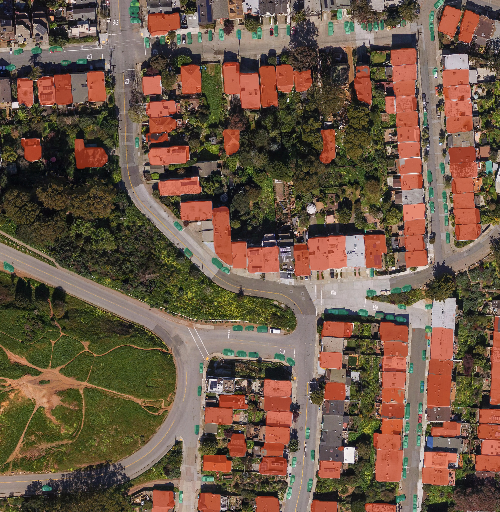
A prepared visual-imagery sample for inspecting urban targets before adapting a workflow.
RasterForge is built for satellite imagery segmentation and aerial image segmentation where targets repeat across scenes. It keeps imagery, render choices, SAM 3 segmentation workflows, edits, review decisions, and export state together under one project.
Import GeoTIFF, PNG, or JPEG imagery, confirm bounds and AOIs, then create sensor-aware or visual render profiles for model-ready views.
Save prompts, image examples, classes, thresholds, and run defaults so a recurring target can be tested once and reused across similar scenes.
Use Find things for repeated targets, Select objects for active-image guidance, or Auto masks for class-agnostic candidates before review.
Choose review masters, use GeoJSON cleanup tools, and export GeoPackage, Shapefile, GeoJSON, masks, Review ZIP, PDF, or CSV.
A RasterForge project keeps the full handoff path visible: imagery, render, target setup, segmentation, cleanup, review selection, and GIS export. Read the quickstart workflow before requesting beta access.
GeoTIFF, PNG, JPEG, bounds, and AOI.
Sensor-aware or visual model input views.
Prompts, examples, classes, thresholds, defaults.
Inspect masks, edit GeoJSON, choose masters.
GeoPackage, Shapefile, GeoJSON, masks, reports.
RasterForge is strongest when a visible target repeats across one or many scenes and the output needs human review before analysis or delivery. Use it for water, wetlands, vegetation, field boundaries, roads, clouds, burn scars, solar sites, ponds, roofs, buildings, and other targets that benefit from render profiles, reusable segmentation profiles, review masters, and GIS-ready export. Browse the practical workflow guides for concrete examples.